---
title: How to Archive a Class
description: Best practice is to create a new class each school year. Classes cannot be deleted, but teachers can mark them as inactive. Learn how to change class status and archive classes with no assignments in schools that self-register.
---
[Skip to content](https://kb.simplesolutions.org/en-us/knowledge-base/how-to-archive-a-class#main-content)
[More support](https://kb.simplesolutions.org/en-us/knowledge-base/kb-tickets/new?hsLang=en-us)
[](https://kb.simplesolutions.org/?hsLang=en-us)
Open main navigation
Close main navigation
- [More support](https://kb.simplesolutions.org/en-us/knowledge-base/kb-tickets/new)
How can we help you?
- There are no suggestions because the search field is empty.
1. [S²TaR Center Knowledge Base](https://kb.simplesolutions.org/en-us/knowledge-base?hsLang=en-us)
2. [Teachers](https://kb.simplesolutions.org/en-us/knowledge-base/teachers?hsLang=en-us)
3. [Classes](https://kb.simplesolutions.org/en-us/knowledge-base/teachers?hsLang=en-us#classes)
# How to Archive a Class
The best practice is to create a new class each school year.
Classes are not able to be deleted. This is in case any data needs to be restored later. To make a class inactive, follow these steps.
Only schools that Self-Register can archive a class. You can only archive a class that has no assignments.
1. From your dashboard, click “**Class Settings**.” 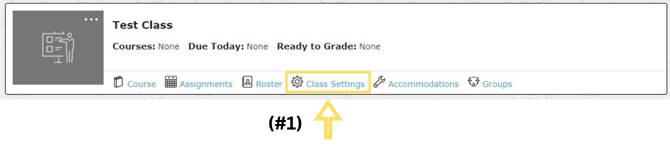
2. Find the drop-down menu called “Class Status” and change the status to “Inactive.” Click “**Save**.” 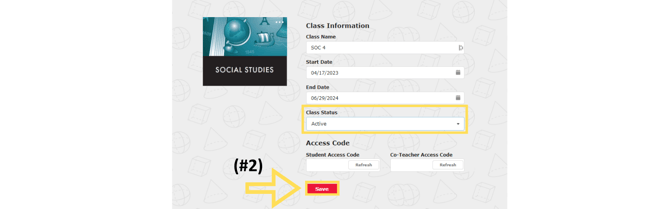
updated 26-27
- [Getting started](https://kb.simplesolutions.org/en-us/knowledge-base/getting-started?hsLang=en-us)
- [Videos](https://kb.simplesolutions.org/en-us/knowledge-base/videos?hsLang=en-us#main-content)
- [Getting Started](https://kb.simplesolutions.org/en-us/knowledge-base/videos?hsLang=en-us#getting-started)
- [Teachers - Classes](https://kb.simplesolutions.org/en-us/knowledge-base/videos?hsLang=en-us#teachers-classes)
- [Teachers - Courses](https://kb.simplesolutions.org/en-us/knowledge-base/videos?hsLang=en-us#teachers-courses)
- [Teachers - Assignments](https://kb.simplesolutions.org/en-us/knowledge-base/videos?hsLang=en-us#teachers-assignments)
- [Teachers - Gradebook](https://kb.simplesolutions.org/en-us/knowledge-base/videos?hsLang=en-us#teachers-gradebook)
- [Teachers - Reports](https://kb.simplesolutions.org/en-us/knowledge-base/videos?hsLang=en-us#teachers-reports)
- [Teachers - Student](https://kb.simplesolutions.org/en-us/knowledge-base/videos?hsLang=en-us#teachers-student)
- [Administrators](https://kb.simplesolutions.org/en-us/knowledge-base/videos?hsLang=en-us#administrators)
- [Students](https://kb.simplesolutions.org/en-us/knowledge-base/videos?hsLang=en-us#students)
- [Skill Builder™](https://kb.simplesolutions.org/en-us/knowledge-base/videos?hsLang=en-us#skill-builder)
- [Teachers](https://kb.simplesolutions.org/en-us/knowledge-base/teachers?hsLang=en-us#main-content)
- [Classes](https://kb.simplesolutions.org/en-us/knowledge-base/teachers?hsLang=en-us#classes)
- [Course](https://kb.simplesolutions.org/en-us/knowledge-base/teachers?hsLang=en-us#course)
- [Assignments/Digital Quizzes](https://kb.simplesolutions.org/en-us/knowledge-base/teachers?hsLang=en-us#assignments-digital-quizzes)
- [Gradebook](https://kb.simplesolutions.org/en-us/knowledge-base/teachers?hsLang=en-us#gradebook)
- [Reports](https://kb.simplesolutions.org/en-us/knowledge-base/teachers?hsLang=en-us#reports)
- [Students](https://kb.simplesolutions.org/en-us/knowledge-base/teachers?hsLang=en-us#students)
- [Administrators](https://kb.simplesolutions.org/en-us/knowledge-base/administrators?hsLang=en-us)
- [Students](https://kb.simplesolutions.org/en-us/knowledge-base/students?hsLang=en-us)
- [Skill Builder™](https://kb.simplesolutions.org/en-us/knowledge-base/skill-builder?hsLang=en-us)
- [Troubleshooting](https://kb.simplesolutions.org/en-us/knowledge-base/troubleshooting?hsLang=en-us)
- [Training](https://kb.simplesolutions.org/en-us/knowledge-base/training?hsLang=en-us)
[](https://simplesolutions.org/)
[mailto:starsupport@simplesolutions.org](mailto:starsupport@simplesolutions.org)
Copyright © 2025, Simple Solutions Learning, Inc