---
title: How Students Access and Take a Quiz
description: Learn how students access and complete assigned quizzes and digital lessons in the S²TAR Center. Includes login steps, assignment visibility, feedback types, and availability for SBM, ESB, and RDG programs.
---
[Skip to content](https://kb.simplesolutions.org/en-us/knowledge-base/how-students-access-and-take-a-quiz#main-content)
[More support](https://kb.simplesolutions.org/en-us/knowledge-base/kb-tickets/new?hsLang=en-us)
[](https://kb.simplesolutions.org/?hsLang=en-us)
Open main navigation
Close main navigation
- [More support](https://kb.simplesolutions.org/en-us/knowledge-base/kb-tickets/new)
How can we help you?
- There are no suggestions because the search field is empty.
1. [S²TaR Center Knowledge Base](https://kb.simplesolutions.org/en-us/knowledge-base?hsLang=en-us)
2. [Teachers](https://kb.simplesolutions.org/en-us/knowledge-base/teachers?hsLang=en-us)
3. [Students](https://kb.simplesolutions.org/en-us/knowledge-base/teachers?hsLang=en-us#students)
# How Students Access and Take a Quiz
Before students can access a quiz, make sure you have assigned it.
1. Students log into their S²TAR Center account.
2. On the Student Dashboard, students will see any lessons or quizzes that have been assigned, sorted by due date and time. Students will click “**Start**” to begin the assignment. Any grayed-out assignment is not open to students yet. 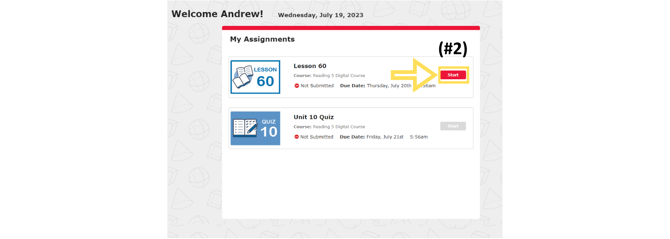
3. Students will answer the questions and navigate through the assignment. 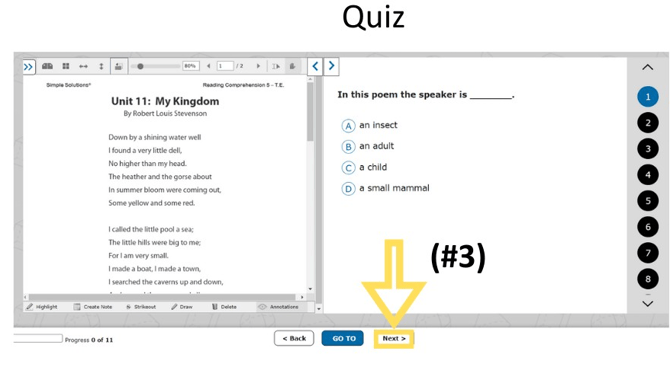
4. At the end of the assignment, students will see their summary page. A Quiz provides delayed feedback after a student submits the entire quiz. To submit their assignment, students will click “**Submit**.” 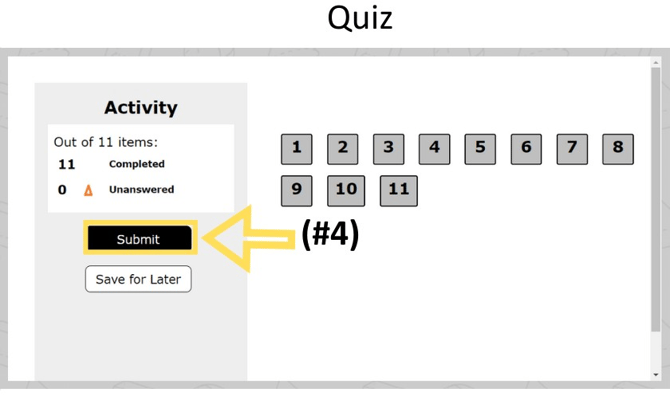
updated 26-27
- [Getting started](https://kb.simplesolutions.org/en-us/knowledge-base/getting-started?hsLang=en-us)
- [Videos](https://kb.simplesolutions.org/en-us/knowledge-base/videos?hsLang=en-us#main-content)
- [Getting Started](https://kb.simplesolutions.org/en-us/knowledge-base/videos?hsLang=en-us#getting-started)
- [Teachers - Classes](https://kb.simplesolutions.org/en-us/knowledge-base/videos?hsLang=en-us#teachers-classes)
- [Teachers - Courses](https://kb.simplesolutions.org/en-us/knowledge-base/videos?hsLang=en-us#teachers-courses)
- [Teachers - Assignments](https://kb.simplesolutions.org/en-us/knowledge-base/videos?hsLang=en-us#teachers-assignments)
- [Teachers - Gradebook](https://kb.simplesolutions.org/en-us/knowledge-base/videos?hsLang=en-us#teachers-gradebook)
- [Teachers - Reports](https://kb.simplesolutions.org/en-us/knowledge-base/videos?hsLang=en-us#teachers-reports)
- [Teachers - Student](https://kb.simplesolutions.org/en-us/knowledge-base/videos?hsLang=en-us#teachers-student)
- [Administrators](https://kb.simplesolutions.org/en-us/knowledge-base/videos?hsLang=en-us#administrators)
- [Students](https://kb.simplesolutions.org/en-us/knowledge-base/videos?hsLang=en-us#students)
- [Skill Builder™](https://kb.simplesolutions.org/en-us/knowledge-base/videos?hsLang=en-us#skill-builder)
- [Teachers](https://kb.simplesolutions.org/en-us/knowledge-base/teachers?hsLang=en-us#main-content)
- [Classes](https://kb.simplesolutions.org/en-us/knowledge-base/teachers?hsLang=en-us#classes)
- [Course](https://kb.simplesolutions.org/en-us/knowledge-base/teachers?hsLang=en-us#course)
- [Assignments/Digital Quizzes](https://kb.simplesolutions.org/en-us/knowledge-base/teachers?hsLang=en-us#assignments-digital-quizzes)
- [Gradebook](https://kb.simplesolutions.org/en-us/knowledge-base/teachers?hsLang=en-us#gradebook)
- [Reports](https://kb.simplesolutions.org/en-us/knowledge-base/teachers?hsLang=en-us#reports)
- [Students](https://kb.simplesolutions.org/en-us/knowledge-base/teachers?hsLang=en-us#students)
- [Administrators](https://kb.simplesolutions.org/en-us/knowledge-base/administrators?hsLang=en-us)
- [Students](https://kb.simplesolutions.org/en-us/knowledge-base/students?hsLang=en-us)
- [Skill Builder™](https://kb.simplesolutions.org/en-us/knowledge-base/skill-builder?hsLang=en-us)
- [Troubleshooting](https://kb.simplesolutions.org/en-us/knowledge-base/troubleshooting?hsLang=en-us)
- [Training](https://kb.simplesolutions.org/en-us/knowledge-base/training?hsLang=en-us)
[](https://simplesolutions.org/)
[mailto:starsupport@simplesolutions.org](mailto:starsupport@simplesolutions.org)
Copyright © 2025, Simple Solutions Learning, Inc