---
title: Admin Course Report
description: Admins can learn how to view, export, and print overall class scores across multiple assignments using the Course Report feature. Get detailed insights into student performance, benchmark categories, and class averages with easy-to-follow steps.
---
[Skip to content](https://kb.simplesolutions.org/en-us/knowledge-base/admin-course-report#main-content)
[More support](https://kb.simplesolutions.org/en-us/knowledge-base/kb-tickets/new?hsLang=en-us)
[](https://kb.simplesolutions.org/?hsLang=en-us)
Open main navigation
Close main navigation
- [More support](https://kb.simplesolutions.org/en-us/knowledge-base/kb-tickets/new)
How can we help you?
- There are no suggestions because the search field is empty.
1. [S²TaR Center Knowledge Base](https://kb.simplesolutions.org/en-us/knowledge-base?hsLang=en-us)
2. [Administrators](https://kb.simplesolutions.org/en-us/knowledge-base/administrators?hsLang=en-us)
# Admin Course Report
Note: At the end of the school year, we recommend downloading any data/reports by June 20th. After this date, you will not have access to the previous year’s data.
**To View and Export Class Averages within a Grade Level:**
1. Log into your account and select “**School Admin**.” 
2. Select “**Reports**.” 
3. Under Course Report, select “View Report.” 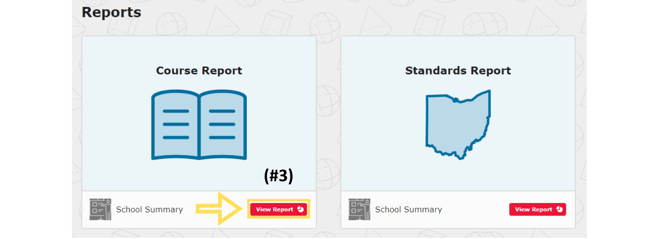
4. Use the drop-down menu to select the desired “Course.” 
5. Select “Details” to see all classes attached to this course. 
6. Click the triangle to expand, and scroll to find the correct unit(s). Click the triangle to expand the unit. Here you can see a visual breakdown of each class’s average compared to the school average. 
7. To Export this information, in the upper right corner, click “**Export**.” 
8. Your email will be automatically generated. Then click “Send.” The export report does not arrive instantly. If the report has not been delivered within 2 hours, check your spam/folder and resubmit if necessary. (Check that your email is correct.) 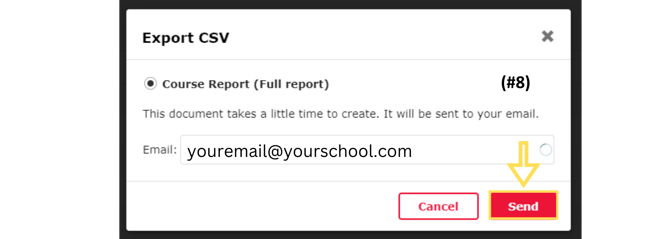
You can also access reports from the **"Notifications"** tab in the STAR Center.
**To View and Export Individual Class Data:**
1. Go to the “Course Report-School Detail (By Class)” page (follow steps 1–5 above to get there). Select the class from the roster. You will see a class abbreviation in blue. If you hover over the abbreviation, you will see the teacher’s name and class name. 
2. See [Teacher Course Report](https://kb.simplesolutions.org/en-us/knowledge-base/teacher-course-report?hsLang=en-us) for more information on accessing individual class data.
updated 26-27
- [Getting started](https://kb.simplesolutions.org/en-us/knowledge-base/getting-started?hsLang=en-us)
- [Videos](https://kb.simplesolutions.org/en-us/knowledge-base/videos?hsLang=en-us#main-content)
- [Getting Started](https://kb.simplesolutions.org/en-us/knowledge-base/videos?hsLang=en-us#getting-started)
- [Teachers - Classes](https://kb.simplesolutions.org/en-us/knowledge-base/videos?hsLang=en-us#teachers-classes)
- [Teachers - Courses](https://kb.simplesolutions.org/en-us/knowledge-base/videos?hsLang=en-us#teachers-courses)
- [Teachers - Assignments](https://kb.simplesolutions.org/en-us/knowledge-base/videos?hsLang=en-us#teachers-assignments)
- [Teachers - Gradebook](https://kb.simplesolutions.org/en-us/knowledge-base/videos?hsLang=en-us#teachers-gradebook)
- [Teachers - Reports](https://kb.simplesolutions.org/en-us/knowledge-base/videos?hsLang=en-us#teachers-reports)
- [Teachers - Student](https://kb.simplesolutions.org/en-us/knowledge-base/videos?hsLang=en-us#teachers-student)
- [Administrators](https://kb.simplesolutions.org/en-us/knowledge-base/videos?hsLang=en-us#administrators)
- [Students](https://kb.simplesolutions.org/en-us/knowledge-base/videos?hsLang=en-us#students)
- [Skill Builder™](https://kb.simplesolutions.org/en-us/knowledge-base/videos?hsLang=en-us#skill-builder)
- [Teachers](https://kb.simplesolutions.org/en-us/knowledge-base/teachers?hsLang=en-us#main-content)
- [Classes](https://kb.simplesolutions.org/en-us/knowledge-base/teachers?hsLang=en-us#classes)
- [Course](https://kb.simplesolutions.org/en-us/knowledge-base/teachers?hsLang=en-us#course)
- [Assignments/Digital Quizzes](https://kb.simplesolutions.org/en-us/knowledge-base/teachers?hsLang=en-us#assignments-digital-quizzes)
- [Gradebook](https://kb.simplesolutions.org/en-us/knowledge-base/teachers?hsLang=en-us#gradebook)
- [Reports](https://kb.simplesolutions.org/en-us/knowledge-base/teachers?hsLang=en-us#reports)
- [Students](https://kb.simplesolutions.org/en-us/knowledge-base/teachers?hsLang=en-us#students)
- [Administrators](https://kb.simplesolutions.org/en-us/knowledge-base/administrators?hsLang=en-us)
- [Students](https://kb.simplesolutions.org/en-us/knowledge-base/students?hsLang=en-us)
- [Skill Builder™](https://kb.simplesolutions.org/en-us/knowledge-base/skill-builder?hsLang=en-us)
- [Troubleshooting](https://kb.simplesolutions.org/en-us/knowledge-base/troubleshooting?hsLang=en-us)
- [Training](https://kb.simplesolutions.org/en-us/knowledge-base/training?hsLang=en-us)
[](https://simplesolutions.org/)
[mailto:starsupport@simplesolutions.org](mailto:starsupport@simplesolutions.org)
Copyright © 2025, Simple Solutions Learning, Inc