---
title: Adjust Student Scores
description: Access and manage student performance in Skill Builder™ using the Gradebook. View assignment details, question-level scores, and adjust points as needed. Navigate student responses and items with intuitive grading tools.
---
[Skip to content](https://kb.simplesolutions.org/en-us/knowledge-base/adjust-student-scores#main-content)
[More support](https://kb.simplesolutions.org/en-us/knowledge-base/kb-tickets/new?hsLang=en-us)
[](https://kb.simplesolutions.org/?hsLang=en-us)
Open main navigation
Close main navigation
- [More support](https://kb.simplesolutions.org/en-us/knowledge-base/kb-tickets/new)
How can we help you?
- There are no suggestions because the search field is empty.
1. [S²TaR Center Knowledge Base](https://kb.simplesolutions.org/en-us/knowledge-base?hsLang=en-us)
2. [Teachers](https://kb.simplesolutions.org/en-us/knowledge-base/teachers?hsLang=en-us)
3. [Assignments/Digital Quizzes](https://kb.simplesolutions.org/en-us/knowledge-base/teachers?hsLang=en-us#assignments-digital-quizzes)
# Adjust Student Scores
1. From your dashboard, click “**Assignments**” in the upper-right corner. 
2. Use the search bar, filters, and tabs to find the correct assignment. 
3. Click “**Gradebook**” to see student data on the assignment. 
4. From the summary page, click “**Details**.” 
5. On the “Details” page, you can see students’ percentages and scores, as well as a snapshot of student scores on each question. To adjust a student's score on a question, click the question score box for that question/student. 
6\. On the teacher grading panel, you can adjust the score for that question. You can add or take away points as needed. Points cannot exceed the total points allowed for the question. Navigate using the “Previous Student” and “Next Student” buttons to see all students’ answers on a particular question. Navigate using the “Previous Item” and “Next Item” buttons to move through the assignment as needed. 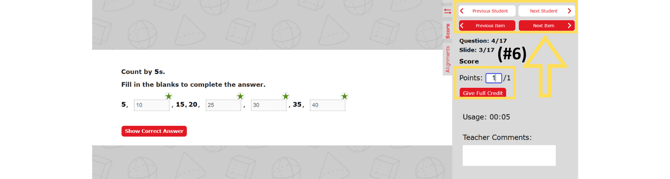
updated 26-27
- [Getting started](https://kb.simplesolutions.org/en-us/knowledge-base/getting-started?hsLang=en-us)
- [Videos](https://kb.simplesolutions.org/en-us/knowledge-base/videos?hsLang=en-us#main-content)
- [Getting Started](https://kb.simplesolutions.org/en-us/knowledge-base/videos?hsLang=en-us#getting-started)
- [Teachers - Classes](https://kb.simplesolutions.org/en-us/knowledge-base/videos?hsLang=en-us#teachers-classes)
- [Teachers - Courses](https://kb.simplesolutions.org/en-us/knowledge-base/videos?hsLang=en-us#teachers-courses)
- [Teachers - Assignments](https://kb.simplesolutions.org/en-us/knowledge-base/videos?hsLang=en-us#teachers-assignments)
- [Teachers - Gradebook](https://kb.simplesolutions.org/en-us/knowledge-base/videos?hsLang=en-us#teachers-gradebook)
- [Teachers - Reports](https://kb.simplesolutions.org/en-us/knowledge-base/videos?hsLang=en-us#teachers-reports)
- [Teachers - Student](https://kb.simplesolutions.org/en-us/knowledge-base/videos?hsLang=en-us#teachers-student)
- [Administrators](https://kb.simplesolutions.org/en-us/knowledge-base/videos?hsLang=en-us#administrators)
- [Students](https://kb.simplesolutions.org/en-us/knowledge-base/videos?hsLang=en-us#students)
- [Skill Builder™](https://kb.simplesolutions.org/en-us/knowledge-base/videos?hsLang=en-us#skill-builder)
- [Teachers](https://kb.simplesolutions.org/en-us/knowledge-base/teachers?hsLang=en-us#main-content)
- [Classes](https://kb.simplesolutions.org/en-us/knowledge-base/teachers?hsLang=en-us#classes)
- [Course](https://kb.simplesolutions.org/en-us/knowledge-base/teachers?hsLang=en-us#course)
- [Assignments/Digital Quizzes](https://kb.simplesolutions.org/en-us/knowledge-base/teachers?hsLang=en-us#assignments-digital-quizzes)
- [Gradebook](https://kb.simplesolutions.org/en-us/knowledge-base/teachers?hsLang=en-us#gradebook)
- [Reports](https://kb.simplesolutions.org/en-us/knowledge-base/teachers?hsLang=en-us#reports)
- [Students](https://kb.simplesolutions.org/en-us/knowledge-base/teachers?hsLang=en-us#students)
- [Administrators](https://kb.simplesolutions.org/en-us/knowledge-base/administrators?hsLang=en-us)
- [Students](https://kb.simplesolutions.org/en-us/knowledge-base/students?hsLang=en-us)
- [Skill Builder™](https://kb.simplesolutions.org/en-us/knowledge-base/skill-builder?hsLang=en-us)
- [Troubleshooting](https://kb.simplesolutions.org/en-us/knowledge-base/troubleshooting?hsLang=en-us)
- [Training](https://kb.simplesolutions.org/en-us/knowledge-base/training?hsLang=en-us)
[](https://simplesolutions.org/)
[mailto:starsupport@simplesolutions.org](mailto:starsupport@simplesolutions.org)
Copyright © 2025, Simple Solutions Learning, Inc