---
title: Release to Reports (Toggle)
description: Exclude assignments from Course and Standards reports by adjusting settings in the Gradebook. Learn how to toggle “Grades to Reports” off to prevent specific assignment scores and standards data from appearing in reporting tools.
---
[Skip to content](https://kb.simplesolutions.org/en-us/knowledge-base/-toggle-release-to-reports#main-content)
[More support](https://kb.simplesolutions.org/en-us/knowledge-base/kb-tickets/new?hsLang=en-us)
[](https://kb.simplesolutions.org/?hsLang=en-us)
Open main navigation
Close main navigation
- [More support](https://kb.simplesolutions.org/en-us/knowledge-base/kb-tickets/new)
How can we help you?
- There are no suggestions because the search field is empty.
1. [S²TaR Center Knowledge Base](https://kb.simplesolutions.org/en-us/knowledge-base?hsLang=en-us)
2. [Teachers](https://kb.simplesolutions.org/en-us/knowledge-base/teachers?hsLang=en-us)
3. [Gradebook](https://kb.simplesolutions.org/en-us/knowledge-base/teachers?hsLang=en-us#gradebook)
# Release to Reports (Toggle)
Excluding an assignment from reports means that the score and standards data will not be included in the Course and Standards reports.
Teachers have the option to decide whether students can release grades to reports after submitting the assignment. When assigning the lesson, the default setting is “On.” You can adjust this setting at that time by [following the directions here](https://kb.simplesolutions.org/en-us/knowledge-base/how-to-assign-a-digital-quiz-2025-26-school-year?hsLang=en-us). If you need to adjust the setting after assigning, follow these directions.
1. From your dashboard, click “**Assignments**” in the upper-right corner.
2\. Use the search bar, filters, and tabs to find the correct assignment. 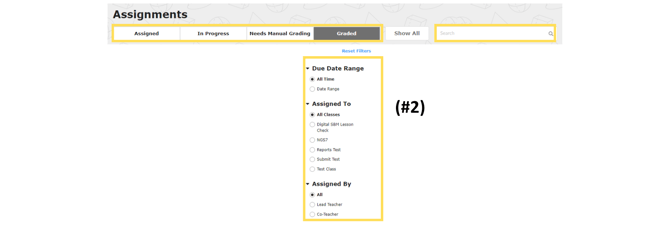
3\. Click “Gradebook” to see student data on this assignment. 
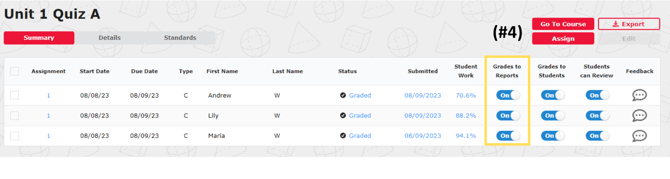
4\. Under “Grades to Reports,” switch the toggle to “Off” for each assignment you want to exclude in reports.
updated 26-27
- [Getting started](https://kb.simplesolutions.org/en-us/knowledge-base/getting-started?hsLang=en-us)
- [Videos](https://kb.simplesolutions.org/en-us/knowledge-base/videos?hsLang=en-us#main-content)
- [Getting Started](https://kb.simplesolutions.org/en-us/knowledge-base/videos?hsLang=en-us#getting-started)
- [Teachers - Classes](https://kb.simplesolutions.org/en-us/knowledge-base/videos?hsLang=en-us#teachers-classes)
- [Teachers - Courses](https://kb.simplesolutions.org/en-us/knowledge-base/videos?hsLang=en-us#teachers-courses)
- [Teachers - Assignments](https://kb.simplesolutions.org/en-us/knowledge-base/videos?hsLang=en-us#teachers-assignments)
- [Teachers - Gradebook](https://kb.simplesolutions.org/en-us/knowledge-base/videos?hsLang=en-us#teachers-gradebook)
- [Teachers - Reports](https://kb.simplesolutions.org/en-us/knowledge-base/videos?hsLang=en-us#teachers-reports)
- [Teachers - Student](https://kb.simplesolutions.org/en-us/knowledge-base/videos?hsLang=en-us#teachers-student)
- [Administrators](https://kb.simplesolutions.org/en-us/knowledge-base/videos?hsLang=en-us#administrators)
- [Students](https://kb.simplesolutions.org/en-us/knowledge-base/videos?hsLang=en-us#students)
- [Skill Builder™](https://kb.simplesolutions.org/en-us/knowledge-base/videos?hsLang=en-us#skill-builder)
- [Teachers](https://kb.simplesolutions.org/en-us/knowledge-base/teachers?hsLang=en-us#main-content)
- [Classes](https://kb.simplesolutions.org/en-us/knowledge-base/teachers?hsLang=en-us#classes)
- [Course](https://kb.simplesolutions.org/en-us/knowledge-base/teachers?hsLang=en-us#course)
- [Assignments/Digital Quizzes](https://kb.simplesolutions.org/en-us/knowledge-base/teachers?hsLang=en-us#assignments-digital-quizzes)
- [Gradebook](https://kb.simplesolutions.org/en-us/knowledge-base/teachers?hsLang=en-us#gradebook)
- [Reports](https://kb.simplesolutions.org/en-us/knowledge-base/teachers?hsLang=en-us#reports)
- [Students](https://kb.simplesolutions.org/en-us/knowledge-base/teachers?hsLang=en-us#students)
- [Administrators](https://kb.simplesolutions.org/en-us/knowledge-base/administrators?hsLang=en-us)
- [Students](https://kb.simplesolutions.org/en-us/knowledge-base/students?hsLang=en-us)
- [Skill Builder™](https://kb.simplesolutions.org/en-us/knowledge-base/skill-builder?hsLang=en-us)
- [Troubleshooting](https://kb.simplesolutions.org/en-us/knowledge-base/troubleshooting?hsLang=en-us)
- [Training](https://kb.simplesolutions.org/en-us/knowledge-base/training?hsLang=en-us)
[](https://simplesolutions.org/)
[mailto:starsupport@simplesolutions.org](mailto:starsupport@simplesolutions.org)
Copyright © 2025, Simple Solutions Learning, Inc